

What is an SMTP sandbox?
An SMTP sandbox accepts the email your application generates and keeps it in a test inbox. SMTPBox does not forward that captured mail to its intended recipients. You can exercise registration, password reset and invoice flows without using a real customer mailbox.
Use separate credentials for development, staging and CI. Keep your production delivery provider configured only in production.
Connect a test SMTP server
- Create an SMTPBox account and choose an inbox.
- Generate SMTP credentials for that inbox.
- Set your mailer to
smtp.smtpbox.dev, port587, with STARTTLS and authentication. - Send an email from your application and open the captured message.
SMTP_HOST=smtp.smtpbox.dev
SMTP_PORT=587
SMTP_USERNAME=your_inbox_username
SMTP_PASSWORD=your_inbox_password
Port 2525 also uses STARTTLS. Port 465 requires implicit TLS. Your SMTP password is separate from your account password and API key.
What can you inspect?
Check the rendered HTML, plain text, headers, raw MIME, recipients, extracted links and attachments. Confirm that template variables were filled, the correct person was addressed and the reset link uses your staging hostname.
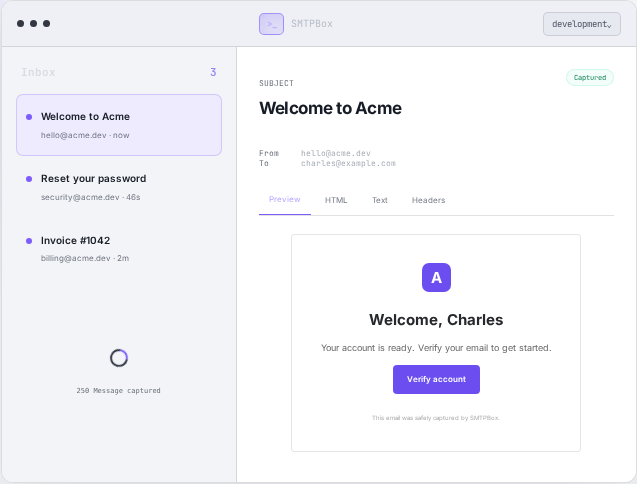
What a sandbox test proves
A captured message shows what your application sent to the sandbox. It does not prove inbox placement at Gmail or Outlook, production deliverability or rendering in every email client. Keep those checks separate from development capture.
Hosted or local?
A local inbox is useful on one developer machine. A hosted inbox gives staging, CI runners and remote teammates a shared place to inspect messages. Read the Mailpit comparison or MailHog comparison to choose the right setup.
Why is no email appearing?
Confirm the application actually sent the message, including any queue worker. Then check the selected inbox, credential and TLS mode. Use the SMTP error reference for authentication failures and connection problems.
Start with a free inbox
Free includes 2,500 captured emails per month and 7-day retention. Unlimited is £14.99 per month with 30-day retention, subject to fair use.
Create your SMTPBox account Compare plans